From Idea to Image, Part Five
The Medium of the Image
By Owrang Editorial
Prepared with Claude; edited and published by Owrang.
About this series
From Idea to Image is a weekly self-study course in making images with AI. The text of the series is also written with the help of AI and is edited and published by Owrang.
Each part teaches one skill and ends with a simple exercise you can do the same day. The images on this page were made with the same description and the same scene you will read below.
Last week we made a character who could move from one image to another while remaining recognizable. We took Mahin, with her green cardigan, round glasses and white streak, from the kitchen by day to the kitchen at night and then into the courtyard. This week we do not move her. The same kitchen, the same glass of tea and the same morning light stay, and something else changes: the medium of the image.
We have written this part like a session of a media-arts class. In such a class, before anyone sits at a computer, the teacher puts a sheet of watercolor paper, a brush and a glass of water on the table. The better we know artistic materials and tools, the more precisely we can describe them, and the more deliberately we can guide the image model toward the result we want.
What the medium is
Every image you have seen is made of something. A photograph of light and grains of silver or a camera sensor. Watercolor of paint dissolved in water and spreading on paper. Gouache of thick, matte paint that sits on the paper and covers what is under it. A pencil drawing of lines and shading that grow darker or lighter with the pressure of the hand. A hand print of a surface that has been cut and inked. We call these the medium of the image. The medium is not just a look. Each medium has its own characteristics, and those characteristics make the feeling of the image.
One thing should be clear from the start. In making images with AI, by the medium of the image we mean recreating the visual qualities of artistic materials and methods, not actually using those materials. An image the model makes "like a linocut" is not a linocut; it is a digital rendering of a linocut's marks.
Today's image models have learned from millions of pictures, and many of them were photographs of paintings, drawings and prints. The model knows the word "watercolor" from those pictures. But "watercolor" on its own is like "a woman in her sixties" last week: it leaves millions of possibilities open. The tool usually arrives at a generic, overly polished watercolor-like image that looks more like an advertisement than like work done on real paper.
The answer is the one we met in Parts Two and Four. Instead of naming a general style, describe its visible qualities. In the medium, those qualities are the traces of material and tool. What follows are common characteristics of each medium, not fixed laws, chosen for this week's exercise.
Traces of the material
In watercolor, paint spreads on wet paper and makes soft edges. Where the water dried, a darker edge remains. In traditional transparent watercolor, the white of the paper is the white of the painting and the lightest places are the bare paper, although some painters also use white gouache. The texture of the paper shows under the paint.
In gouache, the paint is matte and opaque. A light layer can go on top of a dark one. Areas are flat and even, and brushstrokes show a little.
In a pencil drawing, darkness is built from lines laid over each other, parallel or crossing. Edges are sharp in some places and soft in others, and the white paper is the space between the lines.
In a linocut or woodcut, the image is made of flat black and white areas, with no soft shading. The marks of the cutting tool show in the white lines. The ink sometimes sits unevenly, and the grain of the paper shows through.
In a film photograph, fine film grain lies over everything. The blacks are not fully black and the highlights burn out softly. Each film stock has its own colors.
Any of these sentences can go into a prompt. To get an image that looks like a linocut, the word "linocut" alone may not be enough; describing its visible characteristics, from flat black and white areas to the marks of the cutting tool, helps.
Before the computer, by hand
This week, before writing any prompt, work by hand for five minutes. Drop some paint or weak coffee onto wet paper and watch how it spreads. Draw a few parallel lines in pencil and cross them with others. If there is a potato and a knife in the house, cut a simple shape into it, ink or paint it and press it onto paper. Keep these scraps. They make your words more precise, and, as we will see, they can themselves be given to the tool.
If you want to learn to see from masters of the craft, museums and makers of art materials have posted short instructional videos on their own official channels. We list a few official videos at the end of this part. You can watch them free of charge through these links, but free viewing does not mean free republishing. Do not republish any film or image from them without permission, and do not give them to an image tool either.
Today's technology: your own image instead of other people's names
Many of today's image tools let you give an image along with your words and say that its "style" or "medium" should be taken from it. The feature has different names in different tools, style reference, image to image or editing with an image, and its rules differ from tool to tool. Read your tool's guide before you use it.
In this series we follow this policy for using it.
The first right use is your own scrap of paper. Photograph or scan that watercolor blot or potato print and give it to the tool as a reference for the medium. Now the medium of your image has come from your own hand.
The second right use is free works. Paintings and prints in the public domain, like many older works in museums' open collections, can serve as references. Check each work's licence on its own page before you use it. The legal status of a work and of the digital photograph published of it is not the same everywhere, and the terms of your image tool matter too.
And what we avoid: directly imitating the personal style of living artists. Out of respect for artists' rights and creative work, in this series we do not put a living artist's name in a prompt or give their work to the tool. Instead of naming an artist, we describe the qualities of materials, tools and artistic methods. When you use other people's works as references, check the legal status of the work, the licence and the terms of your tool.
This week, step by step
We keep Mahin in the daytime kitchen. The description and the scene stay untouched in every step, and only the sentence about the medium changes. If your tool accepts a reference image, give it Mahin's reference image, as last week.
The base of every prompt is this. "The same woman as in the reference image, with the same face, the same hair, the same glasses and the same clothes." Description. "She sits at the kitchen table holding a glass of tea, with a window beside her. Medium shot at eye level. Soft light from the window on an overcast morning. Horizontal frame, wider than it is tall." In each step, add the sentence about the medium to the end of this base.
Step 1. Photograph. "A photograph shot on film, with fine film grain across the whole image, soft blacks, slightly burnt-out highlights, warm, faded colors." This image is the zero point. Compare the others with it.
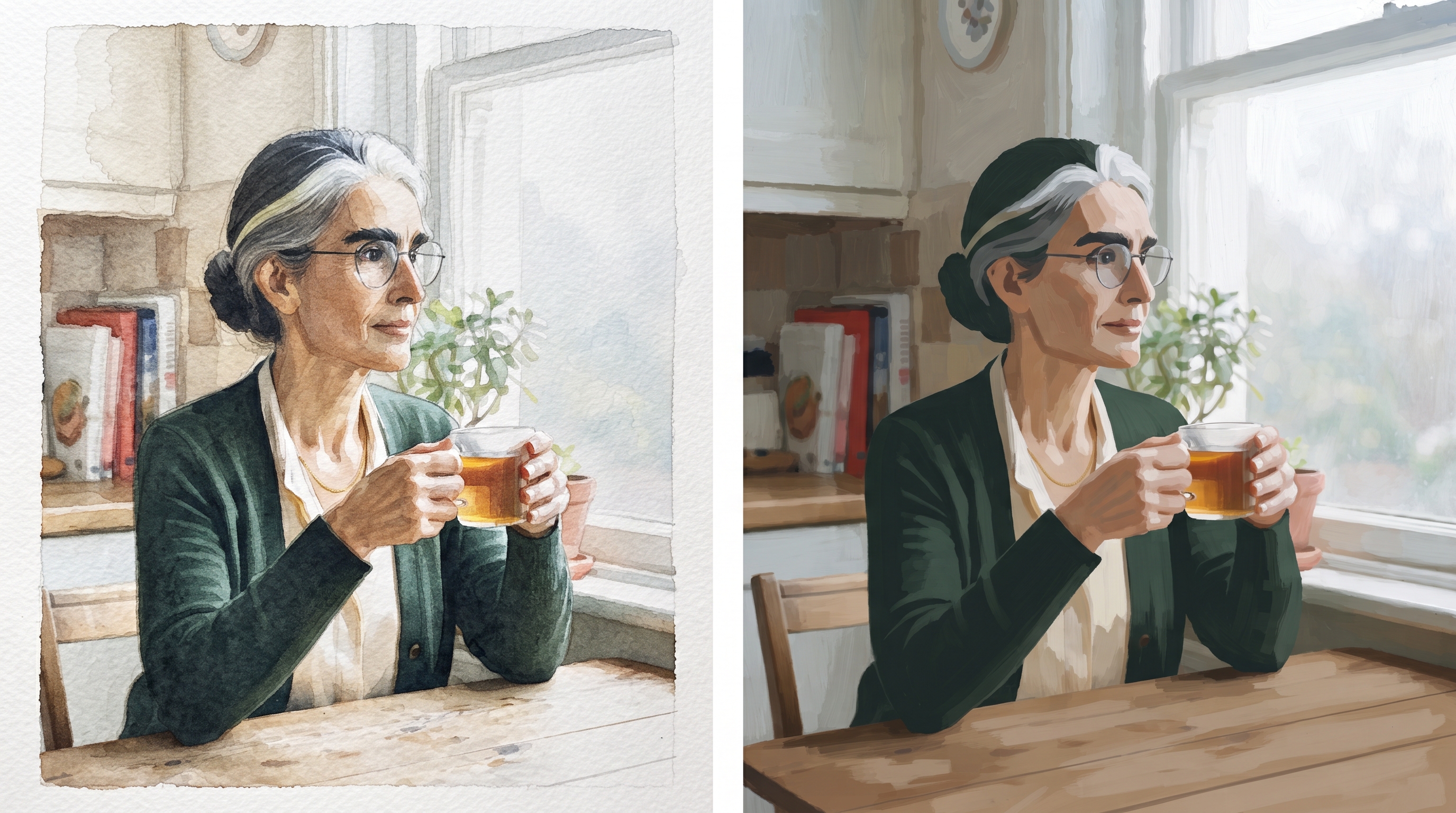
Step 2. Watercolor. "A watercolor painting on textured cold-press watercolor paper. The paint has spread on wet paper and has soft edges, darker edges remain where the water dried, the lightest places are the white of the paper and its texture shows under the paint. Little detail, especially in the background." The last sentence matters. A watercolorist does not paint everything, and the empty space is part of the language.
Step 3. Gouache. "A gouache painting, matte and opaque paint, flat even areas, brushstrokes slightly visible, light layers over dark ones, a limited palette of five or six colors." A limited palette is not a property of gouache itself but our choice for this exercise; it reinforces the matte, simplified look we want and keeps the image away from glossy digital painting.
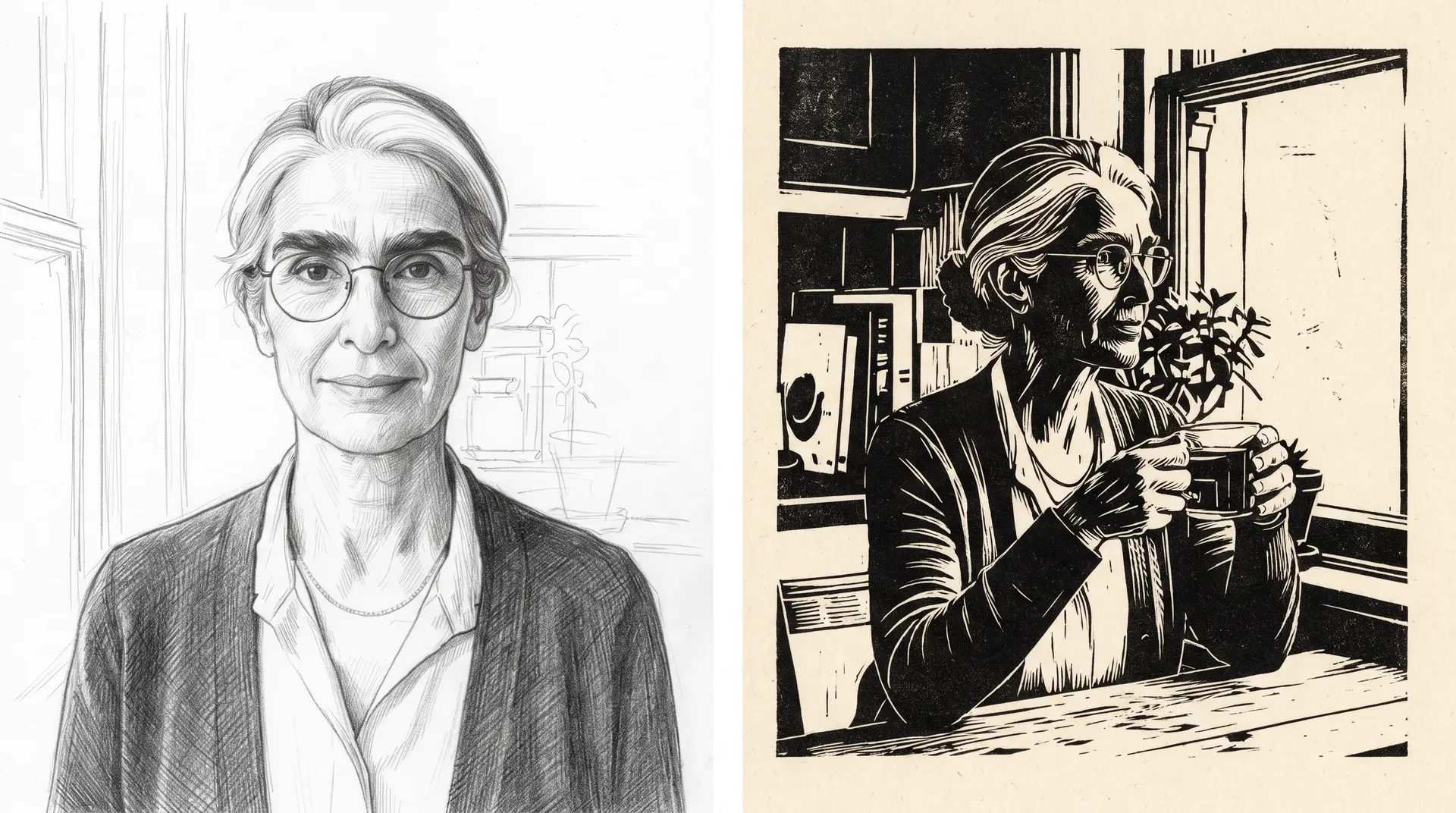
Step 4. Pencil drawing. "A drawing in graphite pencil on white paper. Darkness built from parallel and crossing lines, the pressure of the hand visible in the lines, the face worked with more care and the background with a few quick lines. No color." The difference in care between face and background is a compositional choice that guides the eye, one many draughtsmen make, and the tool usually will not make it unless you say so.
Step 5. Linocut. "A linocut print in black ink on cream paper. Only black and white, no soft shading, flat areas, white cut lines with the marks of the tool, the ink slightly uneven with the grain of the paper showing through." Here the face becomes simpler and last week's markers come into their own. The round glasses and the white streak still say Mahin in black and white.
Step 6. If your tool allows it, give one of your handmade scraps as a reference for the medium and write: "Take the medium and texture of this image, not its shapes or colors." See what the tool makes of the work of your hand.
Step 7. Put the five or six images side by side without the prompts. Under each one write one word for its feeling, as we did with light in Part Three.
When the medium does not come out right
Is your watercolor too clean and glossy? Remove words like high quality, detailed or intricate. They pull the image towards photography and digital painting. Instead, speak of empty space, soft edges and the texture of the paper.
Does the linocut have gray shading? Say plainly: "Only two colors, black and cream, no gray."
Did the face change when the medium changed? That is natural, because each medium simplifies the face in its own language. Go back to the reference image and keep the markers, as last week. In the simpler media the viewer knows Mahin more by her glasses and white streak than by the details of her face.
Did the tool put a signature or fake lettering in the corner? The model learned from signed paintings. Write "no signature, no text" and, if it still appears, crop it or remove it. Never keep a fake signature in your work.
Working words
medium, جنس تصویر، مدیوم
watercolor, آبرنگ
soft edge, لبهٔ نرم
cold-press paper, کاغذ زبر
gouache, گواش
matte and opaque, مات و پوشاننده
limited palette, پالت محدود
cross-hatching, خطهای متقاطع
linocut, چاپ لینولئوم
film grain, دانهٔ فیلم
style reference, مرجع سبک
What happened in practice
Both images on this page were made with Gemini, with the same profile and the same scene as in this lesson, and the image of Mahin from Part Four as the reference for her face.
The image in the middle of the page, watercolor and gouache, came out right on the second try. The first try had two faults. The reference image itself slipped into the picture, so each panel showed two women: Mahin drinking her tea, and the Mahin of the reference looking straight at us. The gouache panel also looked more like a photograph than a painting. For the second try, we wrote at the start of the prompt that the attached image is "only a guide for one woman's appearance: her face, hair, glasses and clothes," and that she appears "once in each panel, alone," and for the gouache we added "clearly a painting and not a photograph," with flat areas of color and visible brushstrokes. You can see the result. In the watercolor panel the paint has spread on wet paper, the edges are soft and the lightest places are the white of the paper itself. In the gouache panel the paint is matte and opaque and the shapes are simplified. If your tool reproduces the reference image itself inside the final picture, do the same: say what the reference is for and how many people are in the frame.
The image at the end of the page, pencil drawing and linocut, is only partially successful. The linocut panel is what we asked for: only black and cream, white cut lines, and the grain of the paper under the ink. But in the pencil panel the model left the scene and drew a portrait. Mahin faces us instead of sitting by the window, there is no glass of tea in her hands, and the white streak at the front of her hair is gone. The hatching and the extra care on the face did come out right. When one of the two panels drifts away from the scene, either remake that panel on its own, or repeat the description of the scene in the paragraph for that panel.
One general point remains from this experience. Even when the description and the scene stay fixed, changing the medium can change the composition and even the face of the character. So this week's exercise is a test of what the tool can do, not a guarantee that the character will stay exactly the same.
This week's exercise
Choose a scene from your past exercises and do not touch it. First, make three scraps by hand: a blue or brown blot on wet paper, a few crossed pencil lines and a simple print from a potato or an eraser. Then make the same scene in four media: photograph, watercolor, pencil drawing and one medium of your choice. If your tool accepts references, once use one of your scraps as the reference for the medium.
Check your work
Put the images next to your handmade scraps. Which image is closer to the work of your hand, and which looks more like a computer "effect"? For that one, find the word that pushed the machine towards gloss and replace it with a word about material or tool. Show the images to someone who has not followed the exercises and ask what each one is made with. If they can recognise the method you intended, you have probably rendered its visual qualities well.
Next week. From the still image to the moving image. How do we bring Mahin out of the frame, so that she breathes, blinks and turns her head? The first step from image to film.
Learning links
All these links go to the official channel or page of the museum or maker itself. Watch and learn, but do not republish anything from them or give it to the machine.
Watercolor. The Museum of Modern Art, MoMA, "How to use watercolor," from the In the Studio series, about sixteen minutes. https://www.youtube.com/watch?v=YIFbLdPDGzo
Watercolor, shorter. Tate, "How to Paint Watercolour Like Turner," Part 1, about five minutes. https://www.youtube.com/watch?v=Wce-7Mw0mtc
Gouache. Winsor & Newton, the paint maker, "Watercolour Vs Designers Gouache," the difference between watercolor and gouache in under five minutes. https://www.youtube.com/watch?v=sjcZ5vtAEK4
Graphite. Smithsonian American Art Museum, "Graphite!," about the material itself, about six minutes. https://www.youtube.com/watch?v=toKcd3b5iBI
Relief printing. MoMA, "Pressure + Ink: Relief Process," a master printer cuts, inks and prints a woodcut. https://www.youtube.com/watch?v=Bjymxow3TVQ
Linocut. Harvard Art Museums, "Picasso's Reduction Linocut Technique." https://www.youtube.com/watch?v=bg6FowI4h8o
Film grain. ILFORD Photo, the film maker, "Film ISO - A beginners guide," why faster film has coarser grain. https://www.youtube.com/watch?v=AQ9rwLC8yqs
Persian painting. British Museum, "Arts of the book," in which the Iranian-born artist Farkhondeh Ahmadzadeh recreates a miniature with traditional pigments, brushes and gold. https://islamicworld.britishmuseum.org/video/6
Persian painting, step by step. Harvard Art Museums, "Artist Demonstration: Persian Miniature Painting," a copy of Riza Abbasi's "Young Dervish." https://vimeo.com/35276945
Style reference in two tools. Adobe Firefly's official guide, "Reference images for styling." https://helpx.adobe.com/firefly/web/work-with-images/generate-images/reference-images-for-styling.html And Midjourney's official guide, "Style Reference." https://docs.midjourney.com/hc/en-us/articles/32180011136653-Style-Reference
از تصور تا تصویر، قسمت پنجم
جنس تصویر
نوشتهٔ Owrang Editorial
تهیهشده با کمک Claude؛ ویرایش و انتشار: اورنگ
دربارهٔ این سلسله
«از تصور تا تصویر» یک خودآموز هفتگی برای تصویرسازی با هوش مصنوعی است. متن این مجموعه نیز با کمک هوش مصنوعی نوشته شده و با ویرایش و انتشار اورنگ در اختیار شما قرار میگیرد.
هر بخش یک مهارت مشخص را آموزش میدهد و با تمرینی ساده تمام میشود که همان روز میتوانید انجام دهید. تصویرهای این صفحه نیز با همان شناسنامه و همان صحنهای ساخته شدهاند که در ادامه میخوانید.
هفتهٔ پیش آدمی ساختیم که از تصویری به تصویر دیگر میرفت و خودش میماند. مهین را با ژاکت سبز، عینک گرد و رگهٔ سفید موهایش از آشپزخانهٔ روز به آشپزخانهٔ شب و بعد به حیاط بردیم. این هفته او را از جایش تکان نمیدهیم. همان آشپزخانه، همان استکان چای و همان نور صبح میماند و چیز دیگری عوض میشود، جنس تصویر.
این بخش را مثل یک جلسه از کلاس هنرهای رسانهای نوشتهایم. در چنین کلاسی پیش از آنکه کسی پشت رایانه بنشیند، معلم یک برگ کاغذ آبرنگ، یک قلممو و یک لیوان آب روی میز میگذارد. چون هرچه مواد و ابزارهای هنری را بهتر بشناسیم، ویژگیهایشان را دقیقتر توصیف میکنیم و مدل تصویرساز را آگاهانهتر به نتیجهٔ دلخواه نزدیک میکنیم.
جنس تصویر یعنی چه
هر تصویری که دیدهاید از چیزی ساخته شده است. عکس از نور و دانههای نقره یا حسگر دوربین. آبرنگ از رنگی که در آب حل شده و روی کاغذ پخش میشود. گواش از رنگی غلیظ و مات که روی کاغذ مینشیند و زیرش را میپوشاند. طراحی مدادی از خط و سایهای که با فشار دست کم و زیاد میشود. چاپ دستی از سطحی که کنده شده و جوهر خورده است. به این چیزها جنس تصویر میگوییم. جنس فقط ظاهر نیست. هر جنس ویژگیهای خودش را دارد و همین ویژگیها حس تصویر را میسازند. در زبان هنر به آن مدیوم (medium) هم میگویند، یعنی ماده یا شیوهٔ ساختن اثر.
یک نکته را از همین آغاز روشن کنیم. در تصویرسازی با هوش مصنوعی، منظور ما از جنس تصویر، بازآفرینی ویژگیهای دیداری مواد و شیوههای هنری است، نه به کار بردن واقعی آن مواد. تصویری که مدل «شبیه چاپ لینولئوم» میسازد، چاپ لینولئوم نیست، بازنمایی دیجیتال نشانههای آن است.
مدلهای تصویرساز امروز از میلیونها عکس آموختهاند، و بسیاری از آنها عکسهایی از نقاشیها، طراحیها و چاپها بودهاند. مدل واژهٔ «آبرنگ» را از روی همین تصویرها میشناسد. اما «آبرنگ» بهتنهایی مثل «زنی شصتساله» در بخش پیش است، میلیونها امکان را باز میگذارد. ابزار معمولاً به تصویری آبرنگنما، یکدست و براق میرسد که بیشتر به تصویر تبلیغاتی میماند تا به کاری که روی کاغذ واقعی انجام شده باشد.
راه چاره همان است که در بخش دوم و چهارم دیدیم. بهجای نام بردن از یک سبک کلی، ویژگیهای دیداری آن را توصیف کنید. در جنس تصویر این ویژگیها ردپای ماده و ابزارند. آنچه در ادامه میآید ویژگیهای رایج هر جنس است، نه قانون همیشگی آن، و برای تمرین این هفته برگزیده شده است.
ردپای ماده
در آبرنگ، رنگ روی کاغذ خیس پخش میشود و لبههای نرم میسازد. جایی که آب خشک شده، لبهای تیرهتر میماند. در آبرنگ شفاف سنتی، سفیدی کاغذ رنگ سفید است و روشنترین جاها همان کاغذ خالی است، هرچند برخی نقاشان گاهی سفید گواش هم به کار میبرند. بافت کاغذ زیر رنگ پیداست.
در گواش، رنگ مات و پوشاننده است. لایهٔ روشن میتواند روی لایهٔ تیره بیاید. پهنههای رنگ تخت و یکدستاند و ضربههای قلممو کمی پیداست.
در طراحی مدادی، تیرگی از روی هم آمدن خطها ساخته میشود، خطهای موازی یا متقاطع. لبهها جایی تیزند و جایی محو، و کاغذ سفید جای خالی میان خطهاست.
در چاپ لینولئوم یا چوب، تصویر از پهنههای تخت سیاه و سفید ساخته میشود، بیسایهروشن نرم. ردپای ابزار کندن در خطهای سفید پیداست. جوهر گاهی ناهموار مینشیند و بافت کاغذ از زیرش دیده میشود.
در عکس با فیلم، دانههای ریز فیلم روی همهچیز هست. سیاهیها کاملاً سیاه نیستند و بخشهای روشن تصویر بهنرمی جزئیات خود را از دست میدهند. هر نوع فیلم رنگهای ویژهٔ خودش را دارد.
هر کدام از این جملهها را میشود در پرامپت آورد. برای رسیدن به تصویری شبیه چاپ لینولئوم، نام این شیوه بهتنهایی کافی نیست. بهتر است ویژگیهای دیداری آن را هم بنویسید، از پهنههای سیاه و سفید تا ردِ ابزار کندن.
پیش از رایانه، با دست
این هفته پیش از نوشتن هر پرامپتی پنج دقیقه با دست کار کنید. یک قطره رنگ یا قهوهٔ رقیق روی کاغذ خیس بریزید و ببینید چطور پخش میشود. با مداد چند خط موازی بکشید و روی آنها خطهای متقاطع بیاورید. اگر سیبزمینی و چاقویی در خانه هست، یک نقش ساده در آن بکنید، جوهر یا رنگ بزنید و روی کاغذ فشار دهید. این تکهکاغذها را نگه دارید. هم واژههایتان را دقیقتر میکنند و هم، چنانکه در ادامه میبینیم، میتوانند خودشان به ابزار داده شوند.
اگر میخواهید دیدن را از استادان کار بیاموزید، موزهها و سازندگان ابزار هنری در کانالهای رسمی خودشان ویدیوهای کوتاه آموزشی گذاشتهاند. پیوند چند ویدیوی رسمی را در پایان این بخش آوردهایم. تماشای رایگان آنها از راه همین پیوندها ممکن است، اما رایگان بودن تماشا به معنای آزاد بودن بازنشر نیست. فیلم یا تصویری از آنها را بیاجازه بازنشر نکنید و به ابزار تصویرساز هم ندهید.
فناوری امروز، تصویر خودتان به جای نام دیگران
بسیاری از ابزارهای تصویرساز امروز به شما امکان میدهند همراه کلمهها تصویری هم بدهید و بگویید از آن «سبک» یا «جنس» بردارد. این امکان در ابزارهای مختلف نامهای گوناگون دارد، مرجع سبک، تصویر به تصویر یا ویرایش با تصویر، و قاعدههایش از ابزاری به ابزار دیگر فرق میکند. پیش از استفاده راهنمای ابزارتان را بخوانید.
برای استفاده از این امکان، این خطمشی را در این مجموعه دنبال میکنیم.
راه درست اول، تکهکاغذ خودتان. همان لکهٔ آبرنگ یا نقش سیبزمینی را عکس بگیرید یا اسکن کنید و بهعنوان مرجع جنس به ابزار بدهید. حالا جنس تصویرتان از دست خودتان آمده است.
راه درست دوم، آثار آزاد. نقاشیها و چاپهایی که مالکیت عمومی دارند، مثل بسیاری از آثار کهن در مجموعههای باز موزهها، میتوانند مرجع باشند. پیش از استفاده، مجوز هر اثر را در صفحهٔ خودش ببینید. وضعیت حقوقی خود اثر و عکس دیجیتالی که از آن منتشر شده همهجا یکسان نیست، و شرایط استفادهٔ ابزار تصویرساز هم اهمیت دارد.
و آنچه پرهیز میکنیم، تقلید مستقیم سبک شخصی هنرمندان زنده. در این مجموعه، برای احترام به حقوق و کار خلاقانهٔ هنرمندان، نام هنرمند زنده را در پرامپت نمیآوریم و کار او را به ابزار نمیدهیم. بهجای نام بردن از یک هنرمند، ویژگیهای مواد، ابزارها و شیوههای هنری را توصیف میکنیم. هنگام استفاده از آثار دیگران بهعنوان مرجع هم وضعیت حقوقی اثر، مجوز استفاده و شرایط ابزار را بررسی کنید.
این هفته، گام به گام
مهین را در آشپزخانهٔ روز نگه میداریم. شناسنامه و صحنه در همهٔ گامها دستنخورده میمانند و فقط جملهٔ جنس عوض میشود. اگر ابزار شما امکان استفاده از تصویر مرجع را دارد، مثل هفتهٔ پیش تصویر مرجع مهین را هم بدهید.
پایهٔ همهٔ پرامپتها این است. «همان زنی که در تصویر مرجع است، با همان چهره، همان مو، همان عینک و همان لباس.» شناسنامه. «پشت میز آشپزخانه نشسته، استکان چایی در دست دارد و پنجرهای کنارش است. نمای متوسط در سطح چشم. نور نرم صبحی ابری از پنجره. قاب افقی، پهنتر از بلندیاش.» در هر گام، جملهٔ جنس را به پایان همین پایه اضافه کنید.
گام ۱. عکس. «عکسی که با دوربین فیلمی (آنالوگ) گرفته شده، با دانهٔ ریز فیلم روی همهٔ تصویر، سیاهیهای نرم و روشنیهای کمی سوخته، رنگهای گرم و کمرنگ.» این تصویر نقطهٔ صفر است. باقی تصویرها را با آن مقایسه کنید.
گام ۲. آبرنگ. «نقاشی آبرنگ روی کاغذ آبرنگ پرس سرد با بافت پیدا. رنگ روی کاغذ خیس پخش شده و لبههای نرم دارد، جای خشک شدن آب لبههای تیرهتر مانده، روشنترین جاها سفیدی کاغذ است و بافت کاغذ زیر رنگ پیداست. جزئیات کم، بهویژه در پسزمینه.» آخرین جمله مهم است. آبرنگکار همهچیز را نمیکشد و جای خالی بخشی از زبان اوست.
گام ۳. گواش. «نقاشی گواش، رنگ مات و پوشاننده، پهنههای تخت و یکدست رنگ، ضربههای قلممو کمی پیدا، لایههای روشن روی لایههای تیره، پالت محدود با پنج یا شش رنگ.» پالت محدود ویژگی ذاتی گواش نیست، انتخاب ما برای این تمرین است، اما ظاهر مات و سادهٔ گواش را تقویت میکند و تصویر را از نقاشی دیجیتال براق دور نگه میدارد.
گام ۴. طراحی مدادی. «طراحی با مداد گرافیت روی کاغذ سفید. تیرگی با خطهای موازی و متقاطع ساخته شده، فشار دست در خطها پیداست، چهره با دقت بیشتری کار شده و پسزمینه با چند خط سریع. بیرنگ.» تفاوت دقت چهره و پسزمینه یک انتخاب ترکیببندی برای هدایت نگاه است که بسیاری از طراحان به کار میبرند، و ابزار اگر نگویید معمولاً انجامش نمیدهد.
گام ۵. چاپ لینولئوم. «چاپ لینولئوم با جوهر سیاه روی کاغذ کرم. تنها سیاه و سفید، بیسایهروشن نرم، سطحهای تخت، خطهای سفید کندهشده با ردپای ابزار، جوهر کمی ناهموار با بافت کاغذ از زیر آن.» اینجا چهره سادهتر میشود و نشانههای هفتهٔ پیش به کار میآیند. عینک گرد و رگهٔ سفید مو در سیاه و سفید هم مهین را نشان میدهند.
گام ۶. اگر ابزارتان اجازه میدهد، یکی از تکهکاغذهای دستساز خودتان را بهعنوان مرجع جنس بدهید و بنویسید. «جنس و بافت این تصویر را بردار، نه شکلها و رنگهایش را.» ببینید ابزار از کار دست شما چه برداشتی میکند.
گام ۷. پنج یا شش تصویر را بدون پرامپت کنار هم بگذارید. زیر هر کدام یک کلمه برای حسش بنویسید، همان کاری که در بخش سوم با نور کردیم.
وقتی جنس درست درنمیآید
آبرنگ شما بیش از اندازه تمیز و براق است؟ واژههایی مثل باکیفیت، دقیق یا پرجزئیات را بردارید. این واژهها تصویر را به سوی عکس و نقاشی دیجیتال میکشند. به جایش از جای خالی، لبهٔ نرم و بافت کاغذ بگویید.
چاپ لینولئوم سایهروشن خاکستری دارد؟ صریح بنویسید «فقط دو رنگ، سیاه و کرم، بیخاکستری».
با عوض شدن جنس، چهره هم عوض شد؟ این طبیعی است، چون هر جنس چهره را به زبان خودش ساده میکند. به تصویر مرجع برگردید و مثل هفتهٔ پیش نشانهها را نگه دارید. در جنسهای سادهتر بیننده مهین را بیشتر از عینک و رگهٔ سفید مویش میشناسد تا از جزئیات صورتش.
ابزار امضا یا نوشتهٔ ساختگی گوشهٔ تصویر گذاشت؟ مدل از نقاشیهای امضاشده آموخته است. بنویسید «بیامضا، بینوشته» و اگر باز آمد، آن تکه را ببرید یا پاک کنید. امضای ساختگی را هرگز در کار خود نگه ندارید.
واژههای کاری
جنس تصویر، مدیوم (ماده یا شیوهٔ هنری)، medium
آبرنگ، watercolor
لبهٔ نرم، soft edge
کاغذ آبرنگ پرس سرد (بافتدار)، cold-press paper
گواش، gouache
مات و پوشاننده، matte and opaque
پالت محدود، limited palette
هاشور متقاطع، cross-hatching
چاپ لینولئوم، linocut
دانهٔ فیلم، film grain
مرجع سبک، style reference
آنچه در عمل اتفاق افتاد
هر دو تصویر این صفحه با Gemini و با همان شناسنامه و همان صحنهای ساخته شدهاند که در این درس آمد، و تصویر مهین از قسمت چهارم مرجع چهره بود.
تصویر میانهٔ صفحه، آبرنگ و گواش، در بار دوم درست درآمد. بار نخست دو خطا داشت. خود تصویر مرجع هم وارد تصویر شد و در هر قاب دو زن نشسته بودند، مهینی که چای مینوشد و مهینِ تصویر مرجع که رو به ما نگاه میکند. قاب گواش هم بیشتر به عکس میمانْد تا نقاشی. برای بار دوم، در آغاز پرامپت نوشتیم که تصویر پیوست «فقط راهنمای چهره، مو، عینک و لباس یک زن» است و این زن «در هر قاب یک بار و تنها» دیده میشود، و برای گواش افزودیم «آشکارا نقاشی، نه عکس» با پهنههای تخت رنگ و ردِ قلممو. نتیجه را میبینید. در قاب آبرنگ، رنگ روی کاغذ خیس پخش شده، لبهها نرماند و روشنترین جاها سفیدیِ خود کاغذ است. در قاب گواش، رنگ مات و پوشاننده است و شکلها ساده شدهاند. اگر ابزار شما خودِ تصویر مرجع را نیز در تصویر نهایی بازتولید کرد، همین کار را بکنید: بگویید مرجع فقط برای چیست و چند نفر در قاب هستند.
تصویر پایان صفحه، طراحی مدادی و چاپ لینولئوم، تنها تا اندازهای موفق است. قاب لینولئوم همان است که خواستیم، فقط سیاه و کرم، خطهای سفیدِ کندهشده و دانهٔ کاغذ زیر جوهر. اما در قاب مدادی، مدل صحنه را رها کرده و یک پرتره کشیده است. مهین رو به ما نشسته، نه کنار پنجره، استکان چای در دستش نیست و رگهٔ سفید جلوی موهایش هم از میان رفته است. هاشورها و دقتِ بیشتر روی چهره درست درآمدهاند. وقتی یکی از دو قاب از صحنه دور میشود، یا همان قاب را جداگانه دوباره بسازید، یا شرح صحنه را در همان بند مربوط به آن قاب تکرار کنید.
از این تجربه یک نکتهٔ کلی هم میماند. حتی وقتی شناسنامه و صحنه ثابت میمانند، عوض شدن جنس میتواند ترکیببندی و حتی چهرهٔ شخصیت را تغییر دهد. پس تمرین این هفته آزمونی برای سنجیدن توانایی ابزار است، نه تضمینی برای ماندن کامل شخصیت.
تمرین این هفته
یک صحنه از تمرینهای گذشتهتان برگزینید و آن را دست نزنید. پیش از هر چیز با دست سه تکهکاغذ بسازید، یک لکهٔ آبی یا قهوهای روی کاغذ خیس، چند خط متقاطع مدادی و یک نقش ساده با سیبزمینی یا پاککن. بعد همان صحنه را در چهار جنس بسازید، عکس، آبرنگ، طراحی مدادی و یک جنس به انتخاب خودتان. اگر ابزار شما امکان استفاده از تصویر مرجع را دارد، یک بار هم یکی از تکهکاغذهایتان را مرجع جنس قرار دهید.
خودتان بسنجید
تصویرها را کنار تکهکاغذهای دستسازتان بگذارید. کدام تصویر به کار دست شما نزدیکتر است و کدام بیشتر به یک «جلوهٔ» رایانهای میماند؟ برای آن یکی، واژهای را پیدا کنید که ماشین را به سوی براقی برده و آن را با واژهای از ماده یا ابزار عوض کنید. به کسی که تمرینها را دنبال نکرده نشانشان دهید و بپرسید هر کدام با چه ساخته شده است. اگر توانست شیوهٔ هنری مورد نظر شما را تشخیص دهد، احتمالاً در بازنمایی ویژگیهای دیداری آن موفق بودهاید.
هفتهٔ آینده. از تصویر ثابت تا تصویر متحرک. چطور مهین را از قاب بیرون بیاوریم، نفس بکشد، پلک بزند و سرش را برگرداند؟ گام نخست از تصویر به فیلم.
پیوندهای آموزشی
همهٔ این پیوندها به کانال یا صفحهٔ رسمی خود موزه یا سازنده میروند. تماشا کنید و بیاموزید، اما چیزی از آنها را بازنشر نکنید و به ماشین ندهید.
آبرنگ. موزهٔ هنر مدرن نیویورک، MoMA، «How to use watercolor» از مجموعهٔ In the Studio، حدود شانزده دقیقه. https://www.youtube.com/watch?v=YIFbLdPDGzo
آبرنگ، کوتاهتر. Tate، «How to Paint Watercolour Like Turner»، بخش یکم، حدود پنج دقیقه. https://www.youtube.com/watch?v=Wce-7Mw0mtc
گواش. Winsor & Newton، سازندهٔ رنگ، «Watercolour Vs Designers Gouache»، تفاوت آبرنگ و گواش در کمتر از پنج دقیقه. https://www.youtube.com/watch?v=sjcZ5vtAEK4
مداد گرافیت. Smithsonian American Art Museum، «Graphite!»، دربارهٔ خود این ماده، حدود شش دقیقه. https://www.youtube.com/watch?v=toKcd3b5iBI
چاپ دستی. MoMA، «Pressure + Ink: Relief Process»، استادکار چاپ یک چاپ چوبی را میکَند، جوهر میزند و چاپ میکند. https://www.youtube.com/watch?v=Bjymxow3TVQ
چاپ لینولئوم. Harvard Art Museums، «Picasso's Reduction Linocut Technique». https://www.youtube.com/watch?v=bg6FowI4h8o
دانهٔ فیلم. ILFORD Photo، سازندهٔ فیلم عکاسی، «Film ISO - A beginners guide»، چرا فیلم حساستر دانهٔ درشتتری دارد. https://www.youtube.com/watch?v=AQ9rwLC8yqs
نگارگری ایرانی. British Museum، «Arts of the book»، فرخنده احمدزاده، هنرمند ایرانیتبار، یک نگاره را با رنگدانههای سنتی، قلممو و طلا بازمیسازد. https://islamicworld.britishmuseum.org/video/6
نگارگری ایرانی، گام به گام. Harvard Art Museums، «Artist Demonstration: Persian Miniature Painting»، رونگاری از «درویش جوان» رضا عباسی. https://vimeo.com/35276945
مرجع سبک در دو ابزار. راهنمای رسمی Adobe Firefly، «Reference images for styling». https://helpx.adobe.com/firefly/web/work-with-images/generate-images/reference-images-for-styling.html و راهنمای رسمی Midjourney، «Style Reference». https://docs.midjourney.com/hc/en-us/articles/32180011136653-Style-Reference